
A clear and actionable guide to ERP implementation. Including the key phases , the critical steps, and best practices for a smooth transition.
Running a manufacturing business is a complex endeavor, yet efficiency and productivity are paramount. Enterprise Resource Planning (ERP) systems offer a comprehensive solution to streamline and simplify operations, enhance decision-making, and drive growth. However, getting an ERP system up and running isn’t a walk in the park—it takes strategic planning and effort.
This post provides a clear and actionable guide to ERP implementation. It will guide you through the key phases of the process, explore the critical steps to be taken, and highlight best practices for a smooth transition.
ERP implementation is the process of installing, configuring, and adopting an ERP system into a business’s operations. This involves taking several steps to ensure that the new system integrates seamlessly into the existing business structure without causing much disruption.
ERP implementation serves three key purposes:
However, achieving these goals is no small feat. ERP implementation is inherently complex due to several factors:
Each of these elements introduces its own set of challenges, making the ERP implementation process a multifaceted project that requires meticulous planning and execution.
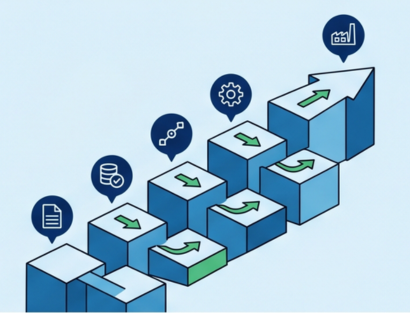
Now, let's understand what key steps are involved in establishing an ERP system. The process typically comprises seven key phases:
The first phase is where you lay the foundation for a successful project. Here's what you'll be focusing on:
Phase 2 is where you configure the ERP system to fit your specific business processes. This involves:
This is a critical step that involves moving data from your existing systems into the new ERP system. It's like packing up your belongings and moving to a new house. Here's what you'll be doing:
Once the data is migrated, it's time to put the system to the test. This phase involves various types of testing to ensure the ERP system is functioning correctly and meets your requirements:
Your ERP implementation success depends on your employees' ability to use the system effectively. Therefore, this phase focuses on:
This is the moment you've been waiting for – the official launch of your ERP system! During this phase, you'll be:
ERP implementation is not a one-time event. There’s ongoing support required; you'll need to:
A successful ERP implementation requires careful planning, effective communication, and a focus on user adoption. Here are some best practices to follow:
Proper planning is essential for a successful ERP implementation. Define your goals and objectives clearly to ensure that the ERP system aligns with your business strategy. Develop a detailed project plan outlining the key phases, timelines, and resources required. Anticipate potential risks and challenges, and develop mitigation strategies to address them proactively.
Engaging key stakeholders from different departments helps create a cross-functional team to ensure buy-in and collaboration. Maintain open communication throughout the project, keeping stakeholders informed about progress, challenges, and decisions. Actively seek input and feedback to address concerns and ensure the ERP system meets the needs of all stakeholders.
User training and support make way for successful ERP adoption. Develop comprehensive training materials tailored to different roles within your organization. Provide hands-on training sessions to help users learn how to use the ERP system effectively. Establish a dedicated help desk or support team to provide ongoing assistance and address any issues that may arise.
Thorough testing throughout the implementation process helps identify and address potential issues early on. Perform functional, integration, and user acceptance testing to ensure the ERP system operates as expected. Gather feedback from users throughout the project to identify areas for improvement and make necessary adjustments to the project plan or ERP configuration.
ERP implementation projects can also present certain challenges that can derail the process if not addressed effectively. Here are some common challenges that organizations often encounter:
Safely migrating data can be a major challenge due to data quality issues, large data volumes, and the complexity of mapping data between different systems. Poor data quality can lead to errors and inaccuracies in the ERP system, while large data volumes can make the migration process time-consuming.
Plus, mapping corresponding fields between the old and new systems can be challenging, especially for complex data structures.
Some users may resist the introduction of a new ERP system due to concerns about job security or the learning curve associated with adopting new processes. Inadequate training can lead to user frustration, errors, and low adoption rates.
Addressing these concerns and providing comprehensive training to ensure that users are equipped to use the new system effectively is important.
Integrating the ERP system with other systems used by the organization can be complex, especially if those systems are outdated or not well-maintained. Ensuring that data is synchronized across different systems can be challenging, especially when dealing with real-time data updates.
The ERP system may not be able to accommodate all of the organization's specific requirements, leading to the need for customizations that can be time-consuming and costly.
ERP implementations can be expensive, and unforeseen costs can arise due to factors such as data migration challenges, customization requirements, or changes in business needs. Delays in the implementation process can lead to increased costs and disruptions to business operations.
The project scope may expand over time, leading to increased costs and delays.
A successful ERP implementation is just the beginning. To ensure ongoing benefits and maximize your investment, it's essential to focus on some post-implementation factors, such as:
To measure the success of your ERP implementation, defining key performance indicators (KPIs) that align with your business goals is necessary. These KPIs should be relevant to your specific goals and aligned with industry best practices.
Regularly monitor and analyze data to assess the impact of the ERP system on your operations. This data should be benchmarked against industry benchmarks to identify areas for improvement and identify optimization opportunities.
ERP systems are essential to the success of many businesses. However, they require ongoing improvement to remain effective. To ensure your ERP system remains competitive, it's important to continually evaluate its effectiveness and identify areas where it can be enhanced.
Make necessary adjustments to processes or the system itself to improve efficiency and performance, and stay updated on industry trends and best practices.
User feedback is essential for improving the ERP system and ensuring its long-term success. Encouraging users to provide feedback and suggestions for improvements is a critical first step. Addressing any concerns promptly and incorporating user input into decision-making processes are essential next steps.
By actively seeking and incorporating user feedback, you can ensure that the ERP system meets the needs of your organization and its employees.
Regular maintenance and updates are essential to the long-term health of your ERP system. Regular maintenance includes scheduled system reviews, backups, and security patches. This ensures that the system remains secure and up-to-date. In addition, regular maintenance helps identify any issues that need to be addressed promptly.
Your organization's needs will evolve over time, so it is important to plan for future upgrades and replacements to ensure that the ERP system continues to meet those needs.
To fully realize the potential of your business, leveraging a state-of-the-art ERP solution can help streamline and simplify the ERP implementation process.
At Kimco, we understand the unique needs of manufacturers and machine shops. That's why our ERP system is designed to simplify the implementation process. Here's how Kimco makes it a seamless process:
Don't let the complexities of the ERP implementation process hold you back from achieving operational excellence.
Book a demo today and discover how our user-friendly ERP solutions and expert support can transform your manufacturing operations.

Start your journey with KIMCO today and explore how our manufacturing management software can simplify your operations, step up productivity, and help you meet all your business goals.
